Download
myplayer မှာ Main Player Software နဲ့ Remote Control App ဆိုပြီး နှစ်မျိုး ရှိပါတယ်။ Main player သည် သီချင်း ၊ ရုပ်ရှင် ၊ tv channels များကို ပြသပေးသော အဓိက ပလေယာ ဆော့ဖ်ဝဲဖြစ်ပြီး remote control app ကတော့ ထို main player ကို Network အတွင်းမှနေ၍ သီချင်း ၊ ဇာတ်ကား ၊ တီဗွီလိုင်း ရှာ ၊ play ၊ pause စသဖြင့် control လုပ်တဲ့ ဆော့ဖ်ဝဲ တစ်ခုဖြစ်ပါသည်။
Main Player Software
myplayer | Your Ultimate Media Universe

Pro-MAX Version 3.5.2
Windows 10/11 အတွက် myplayer 2k22 Pro-MAX main player ဖြစ်ပါတယ်။ AI build-in ပါဝင်ပြီး myTube က သီချင်းတွေကို တိုက်ရိုက် ဆိုသံဖျောက်ပေးနိုင်ပါတယ်။
Download
Pro-SE
Window 10/11 မှာ Pro-MAX version ကို install လုပ်အသုံးမပြုနိုင်တဲ့ စက်တွေအတွက် သီးသန့် ထုတ်ပေးထားတာ ဖြစ်ပါတယ်။ Pro-MAX မှာ ပါဝင်တဲ့ AI features တွေကို support မပေးနိုင်တဲ့အတွက်ကြောင့် ဖြစ်ပါတယ်။ ဒါ့ကြောင့် AI လုပ်ဆောင်ချက် မပါဝင်ပါ။
Download
အောက်က အကြံပြုချက်လေးကို ဖတ်ပေးပါ
Windows Computer အတွက်
1. ယခင် version အဟောင်း v.2.8.0 အထိ install လုပ်ထားပါက uninstall လုပ်ပြီးမှ latest version ကို install လုပ်ပါရန်
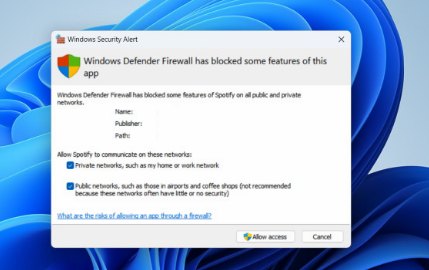
2. myplayer computer software ကို install လုပ်ပြီး ပထမဆုံးအကြိမ် စဖွင့်ဖွင့်ချင်း Firewall access မေးလာပါက ပုံပါအတိုင်း Checkbox ၂ ခုလုံးကို အမှန်ခြစ် ပေးပြီး Allow access ကိုနှိပ်ပေးရမှာဖြစ်ပါတယ်။ဒါမှသာ remote control app ကနေချိတ်ဆက်နိုင်မှာဖြစ်ပါတယ်။ (မမေးလျင် ကိစ္စမရှိပါ)

Retmote Control Software V3

Google Play Store
Android အတွက် remote control app ကို google playstore တွင် myplayer remote လို့ ရိုက်ရှာ၍ အသုံးပြုနိုင်ပါသည်။

Apkpure
Google Play Store မရသော android phone, tablet များအတွက် apkpure တွင်လည်း myplayer 2k22 remote လို့ ရိုက်ရှာနိုင်ပါသည်။


Windows 64bit
Windows 10/11 computer ကနေလည်း remote control app ကို အသုံးပြုနိုင်ပါသည်။ TV Mode, Local Play Features တွေကိုတော့ အသုံးပြုနိုင်မည်မဟုတ်ပါ

macOS [Intel]
macOS (Intel ကနေလည်း remote control app ကို အသုံးပြုနိုင်ပါသည်။ TV Mode, Local Play Features တွေကိုတော့ အသုံးပြုနိုင်မည်မဟုတ်ပါ
Apple Store
iOS [iPhone, iPad] အတွက် remote control app ကို App store တွင် myplayer remote လို့ ရိုက်ရှာ၍ အသုံးပြုနိုင်ပါသည်။
